




Enterprise buyers expect an online buying experience, but what they end up getting is a procurement system with stale catalog files, clunky search, and a free-text requisition form as the fallback.
Punchout catalogs close the gap. They let employees shop a supplier's live, modern webstore, with negotiated pricing and a curated assortment, but without stepping outside the governance of the organization's e-procurement system. The supplier maintains the content; the buyer keeps control of approvals, budgets, and purchase orders.
This guide explains what punchout catalogs are, how the connection works, which protocols are involved, who needs to be at the table, and how to integrate, manage, and future-proof punchout connections.
What Is a Punchout Catalog in Procurement?
A punchout catalog is a supplier-hosted e-commerce site that connects directly to a buyer's e-procurement or source-to-pay platform. Instead of browsing a static list of items loaded into the procurement system, the buyer "punches out" from their platform into the supplier's storefront, shops as they would on any retail site, and then returns the cart to the procurement system — where it becomes a requisition subject to the organization's normal approval workflows, budget checks, and purchase order process.
The name comes from that motion: the user punches out of their own system, into the supplier's and back again. The supplier's site recognizes who the buyer is the moment the session opens and displays that organization's contract pricing, approved assortment, and any buyer-specific restrictions — not the public retail view. Critically, there is no checkout on the supplier's side: the cart is handed back as structured data, and the transaction itself, including approval, PO creation, order transmission, and invoicing, happens through the buyer's governed process.
That division of labor is the core value proposition. Content management, which is expensive and never-ending, lives with the supplier, who already maintains product data, pricing, and stock for its own e-commerce business. Transaction control, where compliance and savings are won or lost, stays with the buyer.
Are You Paying the Right Price — or Just the Lowest Price?
Learn why cost intelligence is procurement’s most important competitive advantage
Understanding the Different Types of Punchout Catalogs
Not all punchout connections behave the same way. The industry generally distinguishes two levels, plus a few variations worth knowing.
Level 1 Punchout
This is the classic model where the buyer clicks the supplier's tile inside the e-procurement system and lands on the supplier's storefront homepage, where all searching and browsing happens. Level 1 is the simplest to implement and works well when users already know which supplier they need. Its weakness is discoverability: a user searching for "safety goggles" in the procurement system won't see the supplier's goggles unless they think to open that catalog first.
Level 2 Punchout
It solves the discoverability problem. The supplier provides index data — a lightweight feed of product names, part numbers, descriptions, and deep links — that the buyer's platform ingests into its native search. A user searching for "nitrile gloves" sees Level 2 punchout results alongside hosted catalog items, and clicking one launches a session directly on that product's page (item-level punchout) or the relevant category page, with live pricing. Level 2 combines the searchability of a hosted catalog with the freshness of supplier-maintained content, at the cost of one more data feed to maintain.
A few variations also appear frequently in practice:
- Transparent punchout takes Level 2 further: the procurement system queries the supplier's site in the background and displays results natively, so the user may never visibly leave their own interface.
- Punchout with quote or configuration support handles complex products — configured IT bundles, engineered components — where the supplier's site walks the user through a configurator or builds a formal quote that returns as a cart with specifications attached.
- Marketplace punchout connects the buyer to a multi-seller marketplace rather than a single supplier's store.
Mature organizations match the punchout type to the category: Level 1 for well-known strategic suppliers, Level 2 or transparent punchout for high-frequency commodity categories where search drives adoption, and quote-enabled punchout for configured purchases.
How Does the Punchout Catalog Connection Workflow Work?
However the connection gets implemented, the workflow follows a consistent choreography between the two systems:
1. Catalog Selection
The user clicks the supplier's catalog tile in the e-procurement system, or, in a Level 2 setup, clicks a search result linked to that supplier.
2. Setup Request
The procurement system sends an authenticated setup request to the supplier's punchout endpoint, identifying the buying organization and user.
3. Validation and Session Creation
The supplier validates the credentials, looks up the buyer's profile, and responds with a unique, time-limited session URL.
4. Storefront Launch
The user's browser opens that URL. Because the session is tied to the buyer's profile, the storefront shows the correct contract pricing, curated assortment, and any configured restrictions.
5. Shopping
The user searches, configures, and adds items to a cart as on any consumer site, with real-time stock and lead times visible.
6. Cart Return
Instead of checking out, the user clicks "return cart." The supplier packages the contents (line items, part numbers, quantities, prices, units of measure, classification codes) into a structured message and sends it back, closing the session.
7. Requisition Creation
The cart lands as a draft requisition. The user (or the system, via defaults) adds accounting codes, cost centers, and delivery details.
8. Approval Workflow
The requisition routes through the normal approval chain, such as budget validation, signoffs, threshold rules. Punchout bypasses nothing; the cart is just a better-quality input.
9. PO Generation and Transmission
Once approved, the system generates a purchase order and transmits it to the supplier electronically.
10. Downstream Document Flow
Order confirmations, ship notices, and invoices can flow back electronically, enabling touchless matching between PO, receipt, and invoice.
To the requisitioner, this feels like a few clicks and a familiar shopping trip. To the integration team, it's a precisely ordered exchange of authentication, session, and document messages — and understanding that sequence is what makes troubleshooting possible.
Technical Protocols Demystified: cXML, OCI, and API Connections
Three connection standards dominate the punchout landscape. You don't need to be a developer to run a punchout program, but knowing what each protocol does helps you have productive conversations with suppliers and IT.
cXML (commerce eXtensible Markup Language)
It is the most widely adopted punchout protocol, particularly in North America, defining XML documents for the full transaction lifecycle. The handshake starts with a “PunchOutSetupRequest” carrying the buyer's identity — typically DUNS numbers or network IDs — plus a shared secret and a return URL. The supplier answers with a “PunchOutSetupResponse” containing the session URL, the returned cart travels as a “PunchOutOrderMessage”, and the purchase order follows as an “OrderRequest”. cXML's strengths are maturity, rich data structures, and near-universal platform support; its friction points are version mismatches and the care required around credential and certificate management.
OCI (Open Catalog Interface)
OCI originated in the SAP ecosystem and remains common in Europe. Where cXML exchanges formal XML documents, OCI works through simpler HTTP mechanics: the buyer's system opens the supplier's punchout URL with authentication parameters appended, and the cart returns as an HTML form post of field-value pairs. OCI is lightweight and quick to implement, but it carries less structured data and defines less of the downstream document flow, so PO and invoice transmission are usually handled separately.
API-based connections
These are the newest layer. Modern platforms increasingly expose REST APIs for real-time price and availability checks, catalog syndication, order status, and richer error handling. APIs also power transparent punchout and marketplace experiences, where the buyer's platform fetches supplier data behind the scenes rather than redirecting the browser. There isn't yet a universal API standard for punchout, but the direction is clear: real-time, service-based connections that treat the supplier's commerce platform as a data source, not just a destination.
In practice, protocol selection comes down to what your platform and your supplier both support. Many large suppliers operate gateways that translate between cXML and OCI, so a mismatch is rarely a dealbreaker. What matters more is agreeing early on protocol and version, documenting the credential exchange, and testing against the real specification.
Explore GEP’s - AI-Native Procure-to-Pay Software
Who Are the Key Stakeholders in a Punchout Catalog Integration Setup?
A punchout integration is a small cross-functional project spanning two organizations, and it moves fastest when every role is identified upfront.
On the buyer side:
- Procurement and category managers own the supplier relationship and the commercial foundation: negotiated pricing, exposed assortment, and the business case for enabling the catalog.
- E-procurement platform administrators configure the supplier record, endpoint, credentials, and field mappings, and manage user access to the catalog.
- IT and security teams handle firewall rules, certificates, and endpoint whitelisting, and vet the integration against security policies.
- Finance and accounts payable define how punchout orders carry accounting data and how invoices will match against POs and receipts.
- End users — the requisitioners — are the ultimate customers. Their adoption determines whether the catalog delivers savings or gets bypassed.
On the supplier side, the e-commerce or integration team stands up the punchout storefront and manages the endpoint, while the account team ensures the buyer-specific view is configured correctly and owns escalation when content issues appear.
Often in the middle sits the e-procurement platform provider or its enablement team, which mediates the connection, supplies test environments, and troubleshoots message-level failures neither side can see alone. Assigning a single buyer-side coordinator who owns the timeline across all these parties is the simplest predictor of a fast enablement.
Benefits of Punchout Catalogs for Enterprises
The business case for punchout rests on a handful of durable advantages:
Always-current content
Pricing, product data, images, and availability are maintained once, on the supplier's live platform — no catalog files to reload, no window where users shop discontinued items at outdated prices.
Contract Compliance by Design
Users shop negotiated pricing and an approved assortment by default, so spend flows to preferred suppliers through the path of least resistance.
Lower Catalog Administration Burden
Punchout shifts the work of validating, loading, and versioning catalog files to the party that already does it for a living.
A Consumer-Grade User Experience
Rich search, configurators, and real-time stock drive adoption — and adoption is what converts negotiated savings from theoretical to realized.
Fewer Errors, Faster Cycles
Structured cart data eliminates rekeying, and electronic PO and invoice flows reduce exceptions and shorten cycle times.
Scalability for Large Assortments
Punchout comfortably handles suppliers with hundreds of thousands of SKUs that would be impractical to host inside the buying platform.
Better Spend Data
Every line arrives with a part number, description, price, and classification — far cleaner analytics inputs than free-text requisitions.
Punchout vs. Hosted Catalogs vs. Static Catalogs: What's the Difference?
The three catalog models are different answers to one question: where should product content live, and who should maintain it?
Hosted catalogs are supplier price files loaded directly into the buyer's e-procurement system. The buyer controls exactly what users see, search is fast and native, and cross-supplier comparison is easy because everything lives in one index. The weaknesses are freshness and effort: content is only as current as the last upload, and maintaining large assortments becomes a standing administrative tax.
Static catalogs — spreadsheets, PDFs, printed lists — sit entirely outside the procurement system, offering no automation, real-time pricing, compliance enforcement, or data capture. A user finds an item, then manually keys a free-text requisition, reintroducing every problem e-procurement was meant to solve.
Punchout catalogs shift content management to the supplier while keeping transaction control with the buyer. Content is always live, but the buyer has less control over presentation, cross-supplier comparison is harder without Level 2 indexing, and every connection requires setup and monitoring.
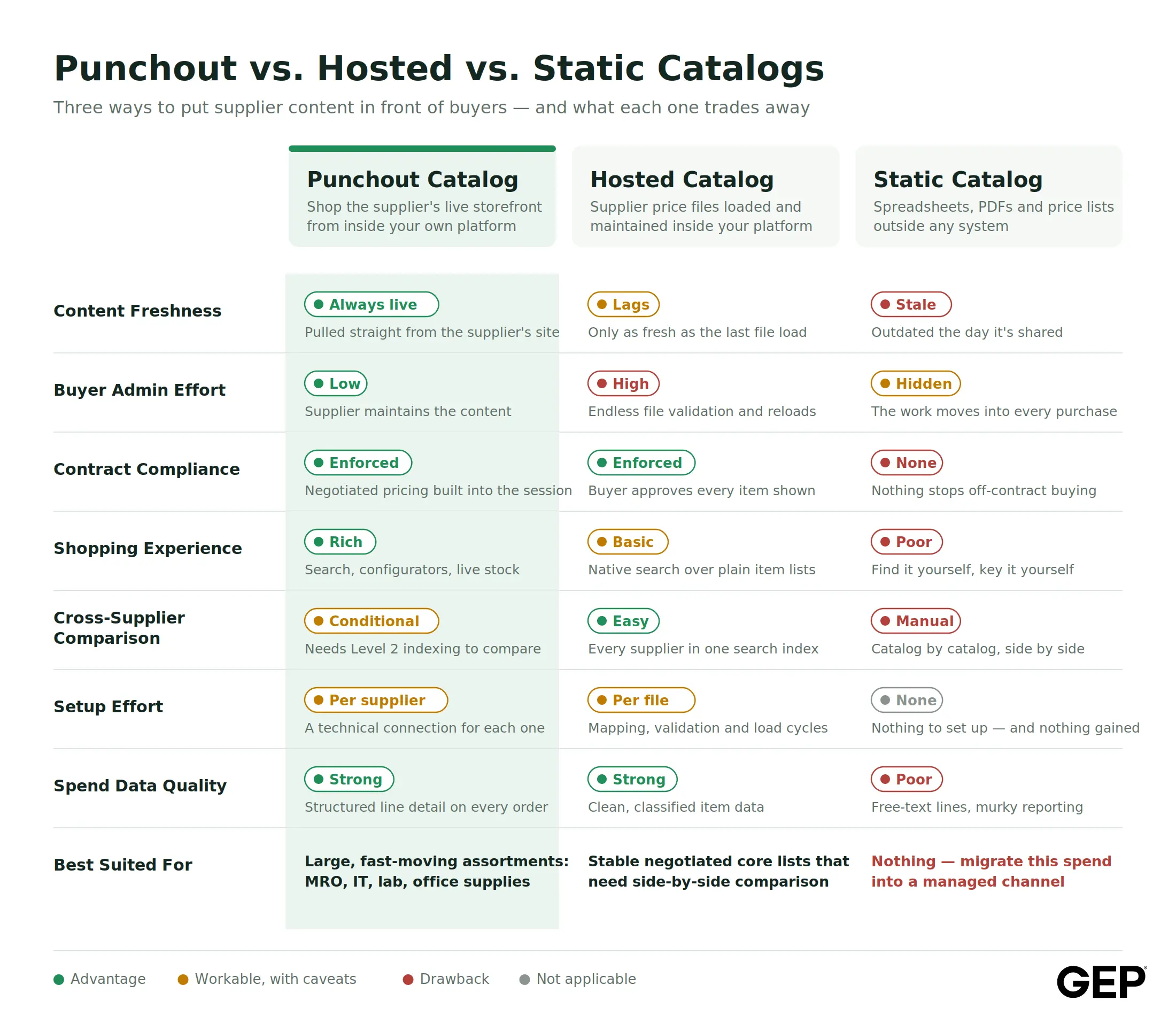
Most mature programs mix the models: hosted catalogs for stable core-item lists where side-by-side comparison matters, punchout for large or dynamic assortments, and static content eliminated wherever possible. The right question is rarely "punchout or hosted?" — it's "which model fits this category and this supplier?"
What Are the Challenges of Connecting Punchout Catalogs to Your E-Procurement Systems?
Punchout is proven technology, but the connections are not plug-and-play. These are the challenges that surface most often:
Protocol and Version Mismatches
A supplier built for OCI facing a platform expecting cXML — or two systems on different cXML versions — means translation work or gateway services before anything flows.
Authentication and Credential Management
Shared secrets, network IDs, and certificates must match exactly on both sides — and they expire, get rotated during unrelated IT projects, and silently break connections. Credential drift is the most common cause of a punchout that "just stopped working."
Cart Data Quality
A cart returning without units of measure, consistent part numbers, or commodity codes creates downstream failures — requisitions that can't be coded, POs that don't match invoices, spend that can't be classified.
Contract Pricing Errors
Because pricing lives on the supplier's side, a misconfigured price file means users may unknowingly requisition at wrong prices — and without audits, errors compound quietly.
Network and Firewall Friction
Enterprise security policies, proxies, and browser settings can block sessions in ways that look like supplier failures but aren't.
Inconsistent user experience
Every supplier's storefront looks and behaves differently, generating support tickets and adoption drag.
Supplier Readiness
Not every supplier has punchout capability, and even capable ones may take weeks to configure a buyer-specific view — enablement timelines are often gated by the supplier's queue, not yours.
Testing and Maintenance Overhead
Each connection needs end-to-end validation — handshake, pricing, cart return, PO, invoice — and, because content updates itself, deliberate post-go-live monitoring to catch price drift and broken sessions.
None of these are insurmountable, but together they explain why punchout enablement should be treated as a managed program with a repeatable playbook, not a series of one-off IT tickets.
Lead with Agentic AI
Drive smarter procurement and resilient supply chains with GEP’s enterprise-proven AI-native platform
Step-by-Step Integration: How to Connect a Punchout Catalog to Your E-Procurement System
Here is a practical sequence for taking a punchout connection from agreement to adoption:
1. Qualify the Supplier and the Use Case
Confirm the supplier supports punchout and at what level, agree on the protocol and version, and decide whether Level 1 or Level 2 fits the category.
2. Align Commercially First
Ensure contract pricing, assortment scope, and restricted items are agreed and documented before technical work begins — the storefront can only reflect what the supplier has been told to configure.
3. Exchange Integration Details
Share credentials (network IDs or DUNS numbers, shared secrets), test and production endpoint URLs, return URLs, and named technical contacts on both sides.
4. Configure the Buyer Side
Set up the supplier record, punchout endpoint, and credentials in the platform; map returned cart fields to requisition fields; configure defaults for commodity codes, GL accounts, and tax treatment.
5. Configure the Supplier Side
The supplier builds the buyer-specific storefront view: contract pricing loaded, assortment curated, restricted categories blocked, correct currency and units applied.
6. Test the Punchout Session in a Sandbox
Validate the setup handshake, confirm the session launches reliably across the browsers your organization uses, and verify that contract pricing — not list pricing — displays.
7. Test the Cart Return Thoroughly
Confirm items, quantities, prices, UOMs, part numbers, and classification data return cleanly and map correctly. Test edge cases: large carts, configured items, special characters, zero-price lines.
8. Test the Order Flow End to End
Transmit a test PO, confirm the supplier receives and acknowledges it, and validate that a test invoice matches against the PO without exceptions.
9. Pilot with a Small User Group
Real users on real purchases surface usability issues and workflow gaps that scripts miss. Run the pilot through at least one full order-to-invoice cycle.
10. Go Live, Communicate, and Monitor
Announce the catalog, place it prominently, update guided-buying rules, brief the help desk — then track session success rates, cart errors, pricing discrepancies, and adoption closely in the first weeks, with a scheduled supplier check-in to work the punch list.
A realistic timeline for a standard connection runs from a couple of weeks to a couple of months, driven mostly by supplier responsiveness and testing discipline — which is exactly why a standardized playbook pays for itself by the second or third enablement.
Listen to GEP’s Podcast - Why Guided Buying is the First Step Toward Digital Transformation
Best Practices for Managing and Maintaining E-Procurement Connections
Go-live is the midpoint of a punchout catalog's life, not the finish line. The programs that sustain value share these habits:
Treat Catalogs as a Managed Portfolio
Maintain an inventory of every connection with a named owner, protocol details, credential expiry dates, and supplier contacts, and review adoption, spend, and error metrics on a regular cadence.
Audit Pricing Periodically
Spot-check punchout prices against contract terms every quarter and after any contract amendment. Because content updates automatically, supplier-side pricing misconfigurations are invisible until someone looks.
Monitor Connection Health Proactively
Alert on failed setup requests, session timeouts, and cart-return errors. Finding out from a dashboard beats finding out from an angry requisitioner.
Stay Ahead of Credential and Certificate Expiry
Track expiration dates centrally and renew before they lapse — this single habit prevents the most common category of sudden outage.
Standardize supplier Enablement
A repeatable playbook — requirements checklist, credential exchange template, test scripts, timeline — cuts weeks off each new connection.
Curate the Shopping Experience
Use guided-buying rules, clear catalog naming, and search tuning so users find the right catalog for the right purchase without training.
Keep a Feedback Loop with Users and Category Managers
Lightweight channels for reporting missing items or price surprises turn requisitioners into a monitoring network, and periodic assortment reviews catch scope creep.
Retire What Isn't Working
A catalog with poor adoption or chronic errors dilutes trust in the whole program. Fix it with the supplier or remove it; don't let it linger.
Examples of Punchout Catalogs
Punchout thrives in categories that combine large, dynamic assortments with frequent, relatively low-value transactions — exactly where hosted catalogs strain and free-text requisitions proliferate. Typical examples include:
- Office supplies and business essentials, where assortments run to tens of thousands of SKUs and prices shift frequently.
- IT hardware, peripherals, and electronics, where product lifecycles are short and configuration options matter.
- MRO and industrial supplies, where plants need fast access to hundreds of thousands of parts with accurate specifications and stock visibility.
- Laboratory equipment and scientific consumables, where researchers need precise catalog numbers, grades, and pack sizes.
- Medical, safety, and PPE supplies, where compliance-grade product data and availability are critical.
- Electrical and datacom products, facilities and janitorial supplies, furniture, and books — all categories where major distributors maintain punchout-ready storefronts as standard practice.
Across these categories, large distributors and manufacturers routinely offer buyer-specific punchout views precisely because their enterprise customers demand them; for many suppliers, punchout capability has become table stakes for winning corporate contracts.
How AI and Automation Are Shaping the Future of Punchout Catalogs
Punchout has spent two decades as reliable plumbing. AI is now turning it into an intelligent buying channel:
Guided and Conversational Buying
AI assistants can interpret a plain-language request — "I need a replacement filter for the Line 3 compressor" — identify the right punchout supplier and item, and pre-fill the requisition. Intake becomes a conversation, and the compliant channel becomes the easiest one.
Smarter Cross-Catalog Search
AI-driven classification and data normalization make Level 2 indexing far richer, harmonizing product data across suppliers so users can genuinely compare equivalent items.
Real-Time Compliance and Price Intelligence
Automation can validate every returned cart against contract terms instantly, flag price anomalies before submission, and suggest lower-cost equivalent or in-stock alternatives at the moment of choice.
Self-Healing Integrations
AI-assisted monitoring can detect failing handshakes, expired credentials, or malformed cart data, diagnose the likely cause from message patterns, and increasingly remediate without a support ticket.
Faster Supplier Enablement
Machine learning applied to product data accelerates catalog mapping, classification, and validation. This shrinks onboarding cycles and lowers the threshold at which enabling a smaller supplier makes economic sense.
Predictive and Proactive Buying
As AI agents mature, punchout connections become the execution layer for automated replenishment: the system detects a need, checks contract pricing and availability through the connection, and presents a ready-to-approve requisition before anyone opens a catalog.
AI-first procurement platforms are embedding these capabilities natively, so punchout stops feeling like a separate destination and becomes part of a unified, intelligent intake-to-pay experience. The connection standards may be decades old; what's built on top of them is changing fast.
Conclusion
Punchout catalogs resolve a tension that has defined enterprise buying for years: employees want a modern, consumer-grade shopping experience, and procurement needs control, compliance, and clean data. Done well, punchout delivers both — live supplier content inside governed workflows, with the supplier maintaining what suppliers maintain best and the buyer controlling what buyers must control.
Getting there takes matching the right catalog model to each category, running disciplined integrations with clear stakeholder ownership, and managing connections actively after go-live. Organizations that treat punchout as a managed program, backed by a repeatable enablement playbook, consistently turn negotiated savings into realized savings.
And the channel is only getting smarter. As AI reshapes procurement platforms, punchout is evolving from static plumbing into an intelligent, searchable, largely self-maintaining buying experience. A unified source-to-pay platform like GEP Quantum Intelligence brings punchout, hosted catalogs, and AI-powered guided buying together in one place — making supplier enablement faster and everyday purchasing effortless.
Explore GEP’s - AI-Native Procurement Software
Frequently Asked Questions
If the supplier's site is down or the handshake fails, the punchout session won't launch, and users can't shop that catalog until service is restored. Requisitions and POs already in flight are unaffected — order transmission runs through a separate channel and typically queues for retry. As a fallback, most organizations allow free-text or non-catalog requisitions against the same supplier, or maintain a small hosted catalog of core items, so urgent purchases aren't blocked. Proactive connection monitoring helps the catalog team catch outages before users do.
The supplier identifies the buying organization — and often the specific business unit or ship-to region — during the setup request, then serves the corresponding storefront view: local currency, region-specific assortment, and the contract pricing negotiated for that entity. Taxes are generally not finalized in the punchout cart; they're calculated by the buyer's procurement or ERP tax engine, or applied on the supplier's invoice according to local rules. Global programs typically configure separate punchout views or credentials per region to keep currency, pricing, and assortment clean.
Because the cart returns into the procurement system as a structured requisition, every punchout purchase generates a normal PO with line-level detail — item description, supplier part number, quantity, price, and commodity classification. That data flows into standard spend analytics, budget tracking, and PO-to-invoice matching just like any other order. In practice, punchout often improves spend visibility, because rich line-level data replaces the vague one-line descriptions typical of free-text requisitions.
Access is controlled inside the buyer's e-procurement platform. Administrators assign catalogs to users, roles, departments, or business units — so a lab team might see scientific suppliers while facilities sees MRO catalogs. Users then find the catalog as a tile or supplier link on their shopping homepage, or, with Level 2 punchout, simply search for the product and click through. If a needed catalog isn't visible, it's usually a permissions setting the catalog administrator can grant in minutes.
Level 1 takes users from the procurement system to the supplier's storefront homepage — all product search happens on the supplier's site, so users must already know which supplier to shop. Level 2 adds an index of the supplier's products inside the buyer's procurement system: users search natively in their own platform, see punchout items alongside hosted catalog results, and click through directly to the live product page with current pricing and availability. Level 2 improves discoverability and cross-supplier comparison but requires the supplier to provide and maintain index data; Level 1 is simpler and faster to enable.